

external_customer_id, and a subscription to one of your plans turns the customer’s usage into invoices. If the External ID differs from the value in your events, even only in letter case, that usage never reaches the customer’s invoices. Creating customers inside your signup request also puts Flexprice in your signup path.
Create customers with the Create customer endpoint or from Customers under Billing in the dashboard, and look one up with Get customer by external ID. For a dashboard walk-through, see Creating a customer.
Choosing an External ID for each customer
The External ID (external_id) is the only link between a customer and its usage. Flexprice stores an event without checking whether any customer has its external_customer_id. When it computes a subscription’s usage, it selects the events whose external_customer_id equals the customer’s External ID.
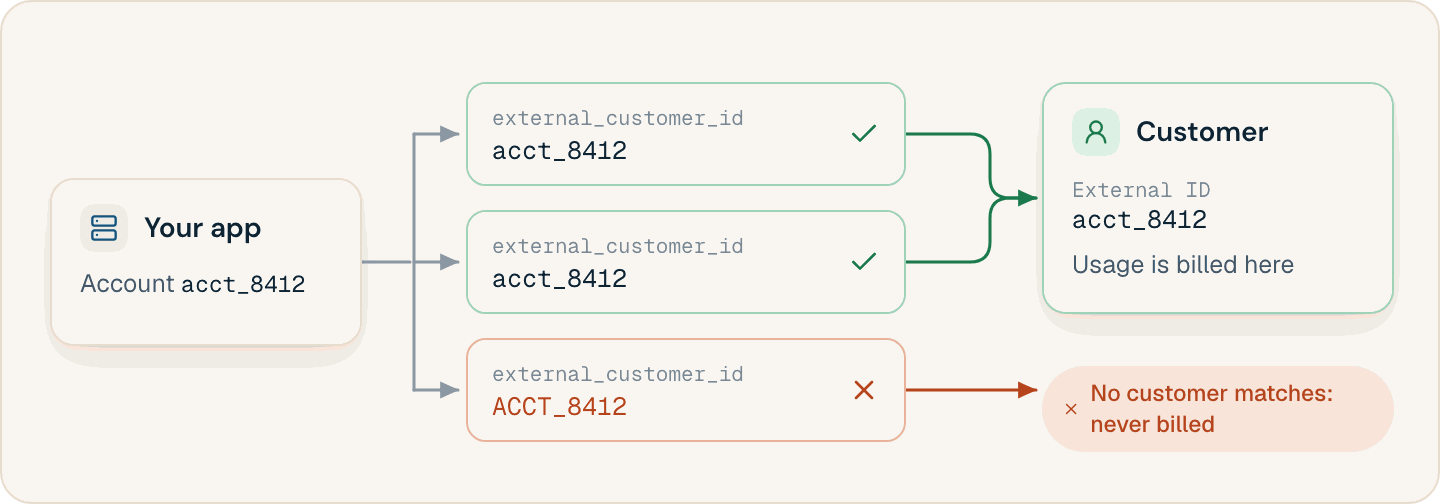
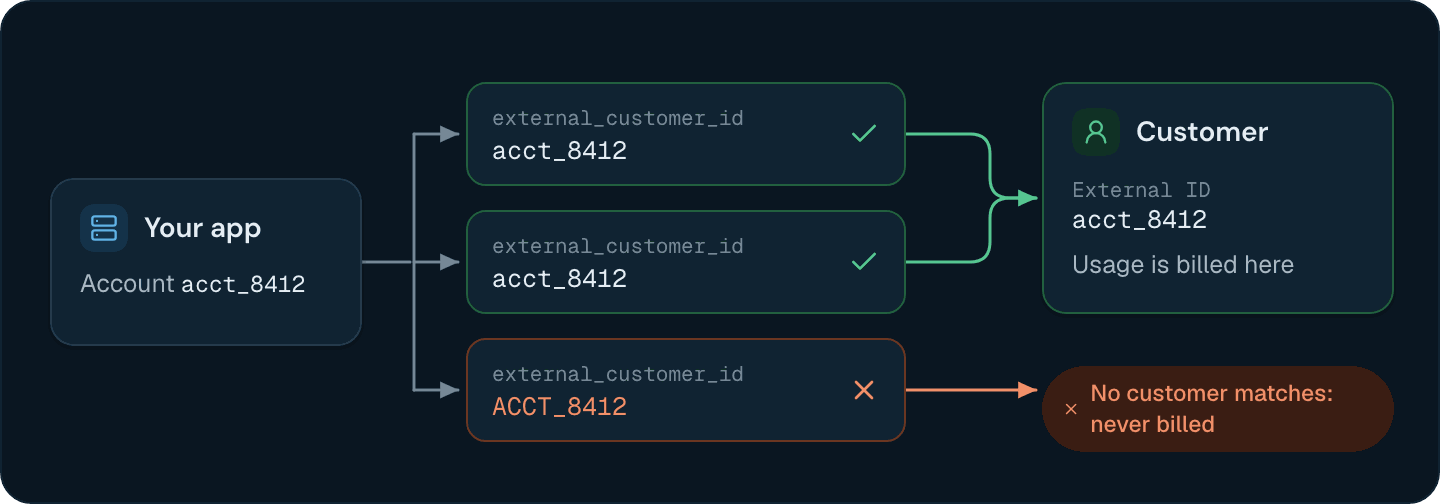
- Unique within an environment. Two customers in one environment can’t share an External ID unless one is archived. The same ID can exist once in each environment.
- Matched exactly, including case.
acme-42andAcme-42are different customers, and an event forACME-42counts toward neither. - One per customer. There are no aliases. If two of your systems identify an account differently, map both to one value before you send events.
- Stable. Use an immutable ID from your own system, such as an account ID, not an email address or a company name.
Setting the customer fields that billing reads
These fields decide which usage reaches the customer, what its invoices show, how they’re taxed, and which currency they’re issued in.Setting timezone, tax, and currency before the first subscription
Set these before you subscribe the customer:- Timezone. A subscription copies the customer’s
timezoneat creation and ignores anytimezonein the subscription request. Changing the customer’s timezone later affects only new subscriptions. With calendar billing, periods start at local midnight, so a customer in India left onUTCgets periods that start at 05:30 local time. - Tax. Unless you send
tax_rate_overrides, a new customer gets your tenant’s auto-applied tax rates, and each new subscription gets the customer’s. A rate added to your tenant later doesn’t reach existing customers.tax_treatmentis read for every invoice, andexemptzeroes the tax. See Tax exempt customers. - Billing currency. Leave
billing_currencyempty to invoice in the subscription’s currency. When it’s set, each invoice is converted at finalization, and an invoice whose currency pair has no exchange rate stays in draft. Setting it later needs an exchange rate for each active, trialing, or paused subscription and each active wallet in another currency.
Creating customers without blocking signup
Your signup flow doesn’t have to wait for Flexprice: events for an External ID with no customer yet are stored, and they count once the customer exists (see Sending usage events before the customer exists).- Create the account in your own system, use its ID as the External ID, and start sending usage.
- Create the Flexprice customer from a background job or queue, not inside the signup request.
- Treat
201and409as success. A409with codealready_existsmeans a customer with this External ID already exists in the environment, for example from an earlier attempt that succeeded but timed out. Fetch it with Get customer by external ID instead of creating another. - Retry timeouts and
5xxresponses with backoff. Don’t retry a400: it fails the same way every time.
external_id returns:
409 changes nothing, so the webhook event, onboarding actions, and provider sync below run only once.
Running onboarding actions for new customers
Thecustomer_onboarding setting, the Customer Onboarding tab in Settings, lists actions that run after a customer is created. It’s empty by default.
create_walletcreates a wallet in the configuredcurrency, optionally with initial credits.create_subscriptionsubscribes the customer to the configuredplan_idwith a monthly billing period.create_customercreates customers from usage events, as described below, and must be the first action.
"skip_onboarding_workflow": true to skip them for one customer. To run another list, add it under custom_workflows and pass its name as onboarding_workflow_name. A name that doesn’t exist runs the default actions.
Creating customers from usage events
Withcreate_customer first, Flexprice can create customers from usage. When it processes an event that one of your features counts and no customer has the event’s external_customer_id, it creates that customer. The new customer is named after the External ID, has no email or address, and uses UTC. Flexprice then runs the remaining actions, and a create_subscription starts at the event’s timestamp unless the action sets a start_date. Add the real name, email, and billing address afterwards, because invoices show them.
Syncing customers with a payment provider
When a Stripe, Razorpay, Chargebee, QuickBooks, Nomod, or Paddle connection has customer outbound sync turned on, Flexprice creates each new customer in that provider and links the two, skipping customers that are already linked. Flexprice also emits thecustomer.created webhook event (see Customer events).
With Stripe Tax as your tax engine, turn on outbound sync for Stripe and send the full billing address when you create the customer. Stripe calculates tax from the address on its own Customer object. Flexprice copies the address there only when it creates the Stripe customer, and only if address_line1 or address_city is set. For a customer missing from Stripe, tax calculation fails with The customer must exist in Stripe before tax can be calculated for them.
A customer created in your connected Stripe account reaches Flexprice through Stripe’s customer.created webhook. Its External ID is the Stripe customer ID (cus_...), unless the Stripe customer’s metadata has a flexprice_lookup_key. Flexprice then uses that value, and links the existing customer with that External ID if there is one. Your usage events must carry the resulting ID. See Stripe customer sync.
Modeling parent and child customers
Customers have no parent field. Create each child account as its own customer, and send its usage under its own External ID. The hierarchy lives in theinheritance object of Create subscription:
- On the parent’s subscription,
external_customer_ids_to_inherit_subscriptionlists the children whose usage rolls up into the parent’s subscription and invoice. - On a customer’s own subscription,
invoicing_customer_external_idsends its invoices to another customer, the payer.
Deleting a customer that has subscriptions or wallets
Delete customer, the Archive action in the dashboard, archives the customer instead of erasing it. It fails with400 and code invalid_operation while the customer has:
Cancel the subscriptions and terminate the wallets first. An archived customer can’t get new subscriptions, and its External ID is free: a new customer can take it, and events that carry it then count toward the new customer.
Customers
What a customer represents in Flexprice.
Creating a Customer
Add a customer and its billing details from the dashboard.
Customer Hierarchy
Roll child usage up to a parent, or bill a separate payer.
Customer Timezones
Align billing periods with a customer’s local calendar.