

Manage features with Create feature, Update feature, and Delete feature. For a field-by-field walkthrough, see Creating a Metered Feature, and for each aggregation, Aggregation Types.
Choosing a feature type
Pick thetype at creation: it can’t be changed later.
Only metered features count usage and can back a usage price. The other types serve entitlements, which tell your application what a plan includes.
Defining what a metered feature counts
A metered feature carries a meter: which events it counts, how it combines them, and which ones it skips. The create request takes the meter inline:event_name: The feature counts events whoseevent_namematches this value exactly, including case.aggregation: Every type exceptCOUNTreads afield, a top-level key in the event’sproperties.SUM,AVG,MAX, andLATESTcan use anexpressioninstead, such asinput_tokens + output_tokens. Flexprice compiles it when you create the feature and rejects one that doesn’t compile.SUM_WITH_MULTIPLIERalso needs amultipliergreater than 0.unit_singularandunit_plural: Set both or neither: the API rejects one without the other.
Counting one event toward several features
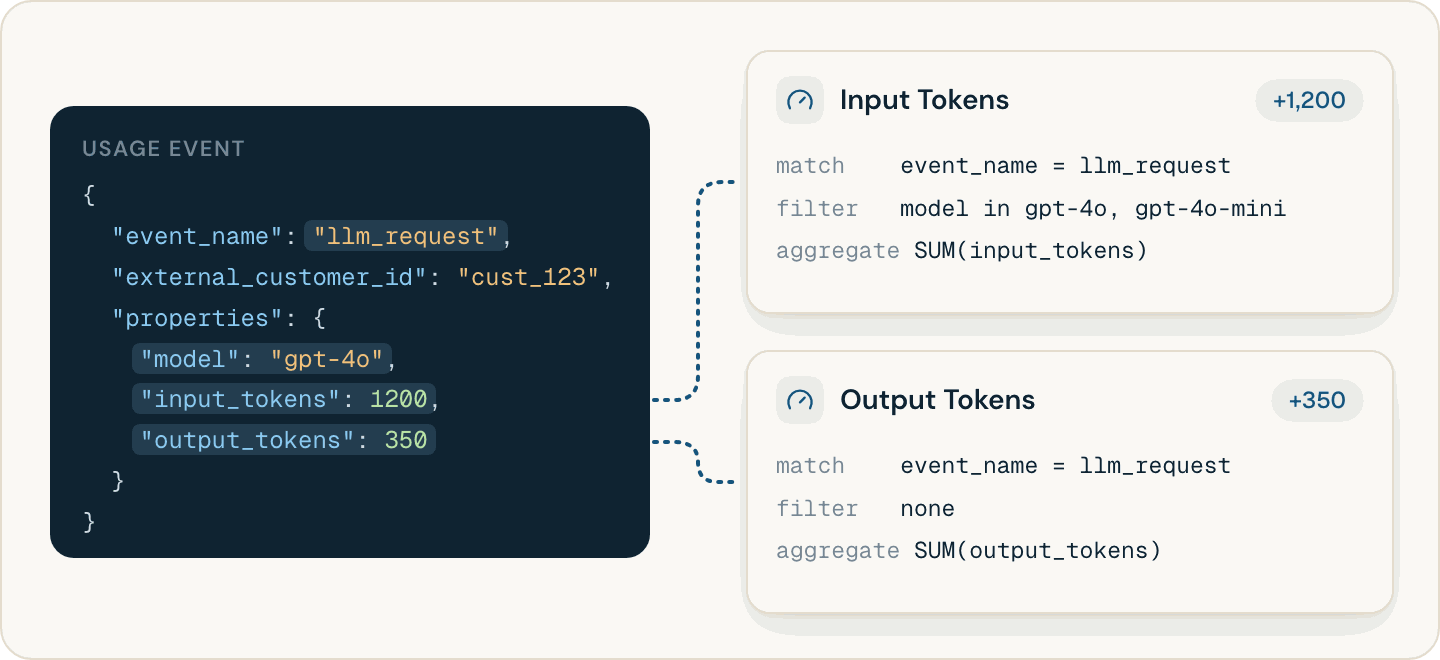
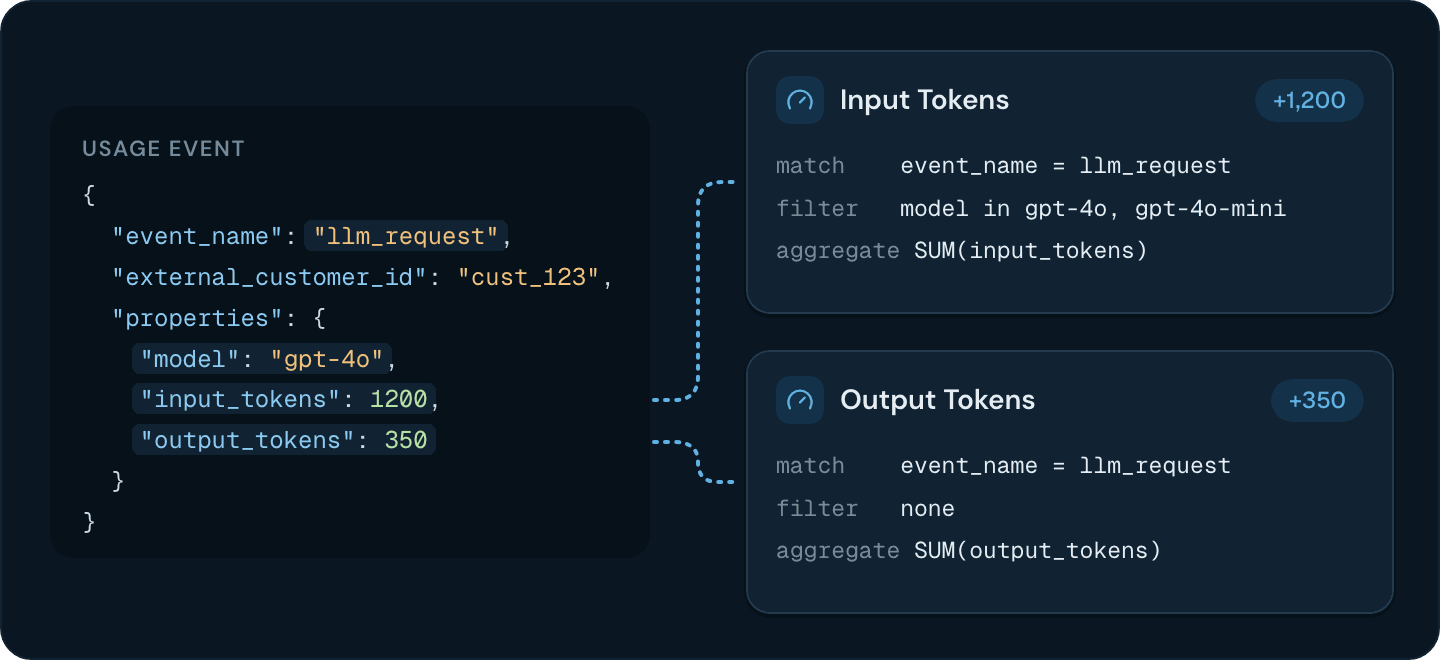
Several features can count the sameevent_name, each with its own filters and aggregation. One llm_request event can feed an Input Tokens feature that sums input_tokens and an Output Tokens feature that sums output_tokens, each with its own price. You can also split an event name by property, such as one feature per model value.
Choosing a usage reset for a metered feature
reset_usage is BILLING_PERIOD or NEVER, and it can’t be changed after creation. Invoices bill the usage inside each billing period with either value. NEVER makes Get usage by meter add all usage from before the start time you query. Set BILLING_PERIOD, and bill a running total such as storage in use as a reading with LATEST or MAX.
Choosing an aggregation for a metered feature
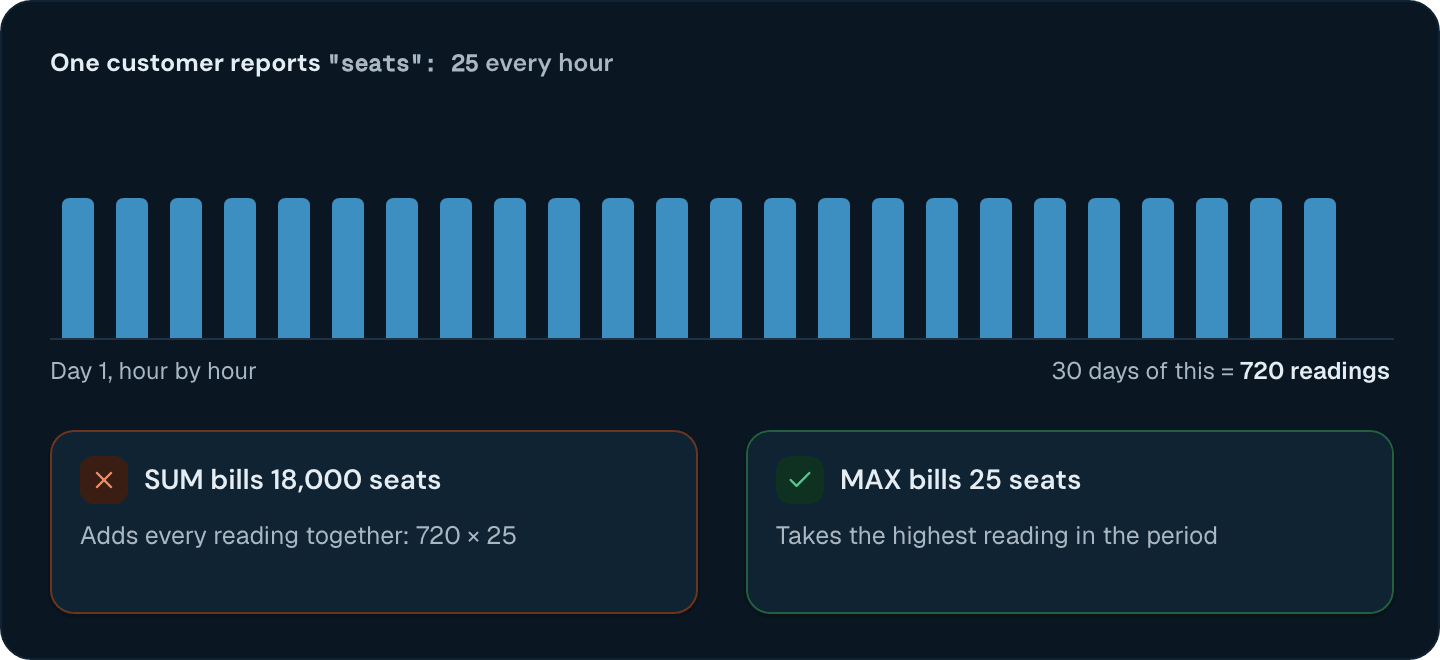
Choose by what each event reports. Adding up action events, such as requests, is correct. Adding up readings, such as seats in use, is wrong.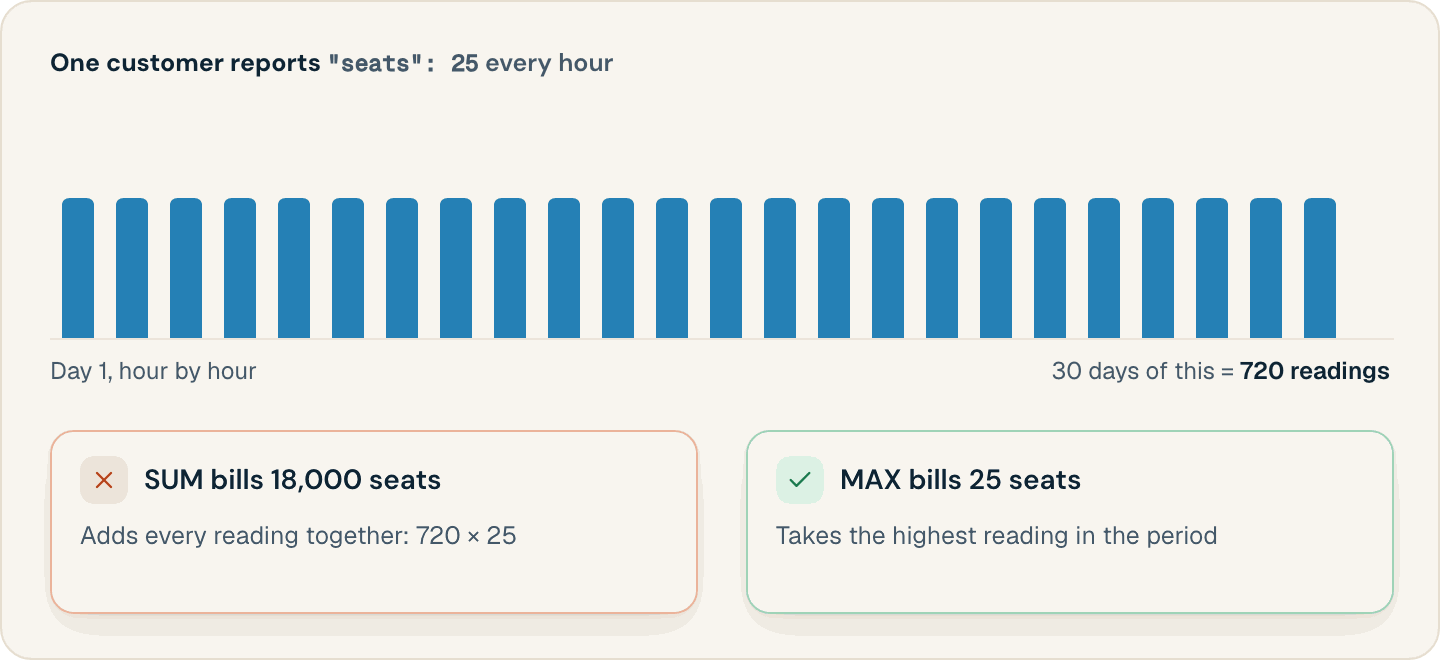
- A reading in every billing period.
MAX,LATEST, andAVGsee only events inside the period, so a period without a reading bills 0. Send readings on a schedule and make them idempotent. - A fixed interval for
AVG.AVGweights every reading equally, whatever time it covers, so uneven intervals skew it.
bucket_size (for example HOUR) on the usage price with Create price. It works with MAX and SUM features. The meter’s aggregation.bucket_size is deprecated.
Counting missing, negative, and non-numeric values
Flexprice accepts any property value and reads it like this:
A 0 still counts as a reading: an event without the property pulls an
AVG down, and sets LATEST to 0 when it’s the period’s latest event. COUNT_UNIQUE skips such events. A field reads only top-level keys in properties, so a nested value such as {"usage": {"tokens": 5}} counts as missing.
Filtering the events a metered feature counts
Each filter names a top-levelkey in properties and the values that count. An event counts only when it matches every key, with any one of that key’s values:
gpt-4o and gpt-4o-mini events from us-east-1 only.
- Matching is exact text, including case.
GPT-4odoesn’t matchgpt-4o. Flexprice compares the property’s value as text, so send the properties you filter on as strings. - An event without the key doesn’t count.
Changing a metered feature after creation
Update feature merges the
filters you send into the existing ones. A value added to an existing key widens the feature. A new key narrows it to events that carry that key.
Flexprice matches an event to features when it processes the event, and invoices bill that result. A filter change or a new feature applies only to events processed after it, and usage already counted stays as it was. Flexprice caches the features for each event name for up to 10 minutes, so a change can take that long to apply.
To change a fixed setting, create a new feature and price it on your plans.
Testing a metered feature before go-live
Test each feature before real usage depends on it:- Create the feature, a plan with a usage price for it, and a test customer subscribed to that plan.
- Send events that cover each filter value, plus one without the aggregated property. If other features already count the event name, wait 10 minutes after creating or changing the feature.
- Look up each event in the Event Debugger, or with Get event and its
idandexternal_customer_id. Aprocessedevent shows the feature and price it was billed to, and the quantity inqty_total. For afailedevent,debug_tracker.failure_point.failure_point_typenames the step that failed:meter_lookupmeans no feature matched the event’s name and filters. - Compare the totals with Get usage analytics, filtered by
external_customer_idandfeature_ids. It reads the same usage records that invoices bill.
When several features count one event, Get event can show only one of them. Get usage by meter doesn’t predict invoices: it reads raw events, applies a feature’s filters only when you pass them, and doesn’t evaluate an
expression.Deleting a feature that a plan uses
Delete feature archives the feature and its meter. It fails with400 and the message Feature is linked to some plans, please remove the feature from the plans first while a published entitlement to the feature exists on a plan, an addon, or a subscription. A usage price doesn’t block it. An archived feature stops counting new events, so its usage price bills no new usage. Remove the feature’s prices and entitlements from your plans first.
Features
What each feature type is for, and how features attach to plans.
Aggregation Types
How each aggregation turns events into a quantity.
Creating a Metered Feature
Set the event name, aggregation, filters, and units.
Event Debugger
Check whether a feature counted an event.