

input_tokens + output_tokens), needs a unit conversion (e.g. duration_ms / 1000), or needs to be rounded, clamped, or floored per event.
Expressions are written in CEL (Common Expression Language). They are validated when the feature is saved, so syntax and type errors surface up front rather than at ingestion time.
Benefits:
- Multi-property quantities — Combine several event fields into one billable number (
input_tokens + output_tokens,cores * hours) - Per-event transforms — Round, floor, ceil, or clamp before aggregation (
ceil(duration_ms / 1000),min(usage, quota)) - Unit conversions — Convert between units per event (
bytes / 1024,duration_ms / 1000) - Validated at save time — Syntax errors, missing operators, and non-numeric expressions are rejected when the feature is created, not per event
- No code deploys — Change the pricing formula from the dashboard when your metering model evolves
Custom Expression is only available for SUM, AVG, MAX, and LATEST aggregations. It is not supported for COUNT, COUNT UNIQUE, SUM WITH MULTIPLIER, or WEIGHTED SUM.
How It Works
For each event, Flexprice reads the top-level properties inevent.properties, evaluates your expression against them, and treats the result as that event’s quantity. The chosen aggregation (SUM / AVG / MAX / LATEST) then runs over those per-event quantities.
- Variables are top-level property names on your events (e.g.
tokens,duration_ms,input_tokens). Nested paths are not supported — flatten the value to a top-level property. - Missing properties are treated as
0. - Numeric strings (e.g.
"2","5.5") are coerced to numbers so events don’t fail just because a field was serialized as a string. - Non-numeric strings,
NaN, and±Infare rejected — the event’s quantity fails to compute and the error is surfaced. - All arithmetic is real-valued. Integer literals are promoted to doubles, so
total / 4withtotal = 10evaluates to2.5, not2.
Step-by-Step Setup
1
Navigate to Features
Go to Product Catalog → Features and click Add Feature.
2
Basic information
- Name: descriptive name (e.g.
Phone Call Seconds) - Type: Select Metered
3
Event configuration
- Event Name: the event you send (e.g.
phone_call) - Aggregation Function: pick Sum, Average, Max, or Latest
- Aggregation Field: the property that would be used if no expression is set (e.g.
tokens). This is still required as a fallback / label.
4
Add the custom expression
Click + Custom expression below the aggregation section.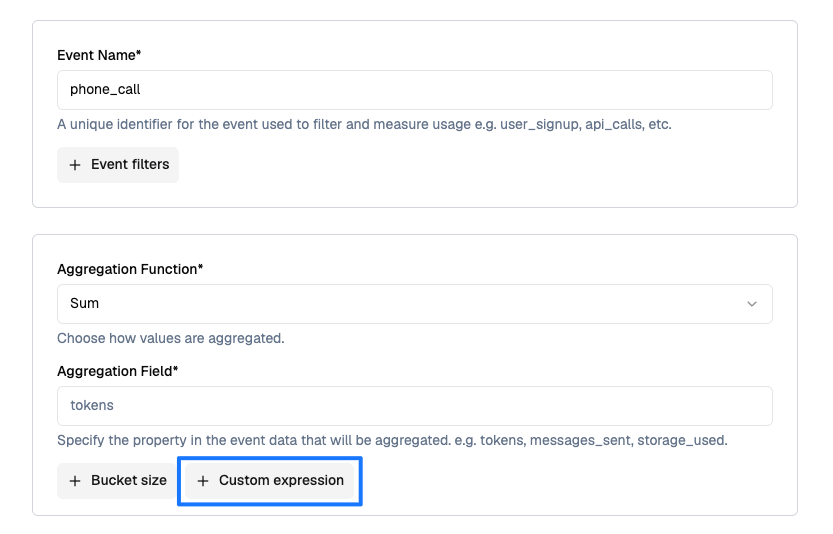
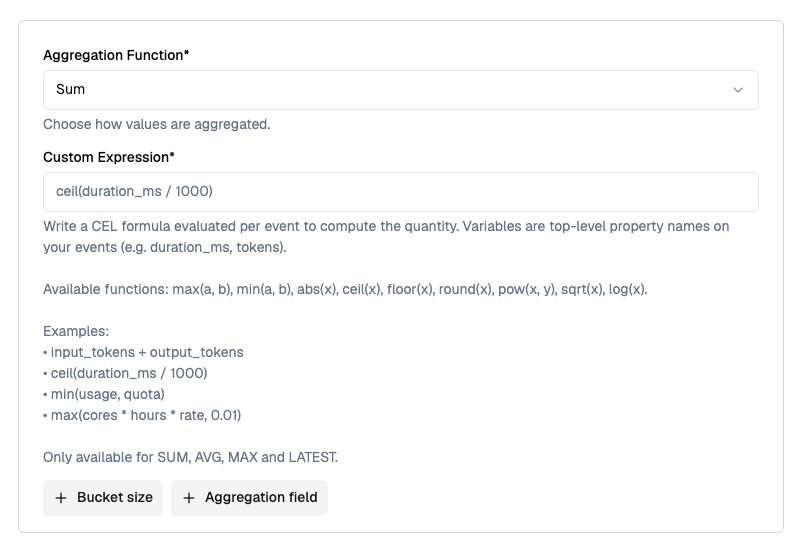
5
Save the feature
On save, the expression is compiled and validated. If it has a syntax error, references no variables, or evaluates to a non-numeric type, saving fails with the error.
Supported Functions
The following math helpers are available inside expressions. All take and return numbers.
Standard CEL operators are also available:
+, -, *, /, <, <=, >, >=, ==, !=, &&, ||, !, and the ternary cond ? a : b.
Calculation Example
Configuration
- Event Name:
phone_call - Aggregation Function: Sum
- Custom Expression:
ceil(duration_ms / 1000) - Unit Name:
second / seconds
Event Data
Calculation Process
- Per-event quantity — Evaluate
ceil(duration_ms / 1000)on each eventevt_001→ceil(4200 / 1000)=5evt_002→ceil(8100 / 1000)=9evt_003→ceil(500 / 1000)=1
- Aggregation — SUM across events:
5 + 9 + 1 = 15
15 seconds
Without the expression, a plain SUM(duration_ms) would have produced 12,800 — the expression bills whole seconds with per-call rounding, which is what the pricing model requires.
Use Cases
Token-based AI billing
Perfect for: LLM APIs that charge different rates for input vs. output tokens. Expression:input_tokens + output_tokens * 3
Rounded call duration (telephony)
Perfect for: Voice APIs billed by the whole second or whole minute, with per-call rounding. Expression:ceil(duration_ms / 1000)
Compute cost per event
Perfect for: Infrastructure billing where quantity depends on multiple dimensions per job. Expression:cores * hours * rate
Quota-clamped usage
Perfect for: Fair-use plans that cap what a single event can contribute. Expression:min(api_calls, 1000)
Pulse pricing (minimum billable unit)
Perfect for: Charging in fixed pulses (e.g. 15-second SMS pulses, 6-second call pulses). Expression:duration <= 10 ? 0 : ceil(duration / 15) * 15
Data transfer with unit conversion
Perfect for: Events emitted in bytes but billed in GB. Expression:bytes / 1073741824
Error Handling
Expressions can fail either at save time (compile) or event time (evaluate). Compile errors block feature creation; evaluate errors cause the specific event’s quantity to fail.Compile-time errors
Surfaced when you save the feature. Fix the expression before saving.Event-time errors
Surfaced per event during ingestion.Test your expression against a few real payloads in a scratch event before switching production traffic. A quick way is to enable the feature on a test plan and confirm the aggregated value matches what you expect.
Critical Notes
- Only SUM, AVG, MAX, and LATEST support custom expressions today.
- Top-level properties only — nested fields (e.g.
payload.tokens) are not addressable; flatten them at ingestion. - Missing properties default to
0, not an error. If a required property is missing on the event, the expression will still evaluate but the quantity will reflect that zero. - CEL reserved keywords cannot be property names inside expressions:
as,break,const,continue,else,false,for,function,if,import,in,let,loop,package,namespace,null,return,true,var,void,while. Rename the property on your event if it clashes. - Real division — Integer literals are promoted to doubles, so
total / 1000returns a real number, not a truncated integer. - Expression changes apply to new events only — Historical events are not re-evaluated when you edit the expression.
Next Steps
- SUM Aggregation — The most common aggregation used with custom expressions
- Creating a Metered Feature — Full feature setup walkthrough
- Sending Events — How to structure
event.propertiesfor expression variables