

-
Navigate to Features
- Go to Product Catalog → Features
- Click “Add Feature”
-
Basic Information
- Name: “Peak Concurrent Users” (or descriptive name)
- Type: Select “Metered”
-
Event Configuration
- Event Name:
concurrent.users(must match your event data) - Aggregation Function: Max
- Aggregation Field:
user_count(the property to find maximum for) - Bucket Size: Optional - Leave empty for standard MAX, or select (HOUR, DAY, etc.) for bucketed MAX
- Group By: Optional - Only used with bucketed MAX. When Bucket Size is set, specify a single property name (e.g.
resource_id) to compute MAX per group within each time bucket, then sum (per bucket and across buckets)
- Event Name:
-
Usage Settings
- Usage Reset: Periodic (for peak tracking per period)
- Unit Name:
user / users
- Save Feature
MAX - Modes
MAX aggregation can operate in two modes depending on whetherbucket_size is specified. group_by is only applied when using bucketed MAX (i.e. when bucket_size is set).
Mode 1: Standard MAX (Non-Bucketed)
When:bucket_size is NOT specified (group_by is not used)Returns: Overall maximum value across all events
Use for: Simple peak detection
Mode 2: Bucketed MAX (Windowed)
When:bucket_size IS specifiedReturns: Sum of maximum values from each time bucket (see formula below)
Use for: Cumulative peak billing, tiered capacity models Optional: Bucketed MAX with group_by
When Group By is also set (a single property name string), within each time bucket events are grouped by that property. For each bucket: MAX is computed per group, then those group maximums are summed. The final result is the sum of these per-bucket totals. Use this for per-resource or per-entity peak billing within time windows (e.g. per resource, per project, per region). group_by has no effect without bucket_size.
Calculation Examples
Standard MAX Example
Event Data
Standard MAX Calculation
Process: Find the highest value across all eventsResult:
40 users (maximum from all events)
Bucketed MAX Example
Configuration
- Bucket Size: HOUR
- Slab Pricing:
- 0-5 GB: 0 Rs (free tier)
- 5-10 GB: 2 Rs per GB
- 10+ GB: 3 Rs per GB
Event Data
Bucketed MAX Formula
bucket_size.
Calculation Process
Hour 1 (7:00-8:00 UTC):- Events: 8 GB, 4 GB
- Bucket Maximum: 8 GB
- Events: 10 GB, 5 GB, 9 GB
- Bucket Maximum: 10 GB
Tiered Billing Calculation
Billing Calculation for 18 GB total:- First 5 GB: 0 Rs
- Next 5 GB (5-10): 5 × 2 = 10 Rs
- Remaining 8 GB (10-18): 8 × 3 = 24 Rs
- Total: 34 Rs
Bucketed MAX with group_by Example
Group By is only available with bucketed MAX. When set, within each time bucket events are grouped by the chosen property; MAX is computed per group in that bucket, then those group maximums are summed. The final result is the sum of these per-bucket totals. Useful for per-resource or per-entity peak billing within time windows.Configuration
- Aggregation Field:
data - Bucket Size: HOUR (required for group_by to apply)
- Group By:
resource_id(single property name; must exist on event properties)
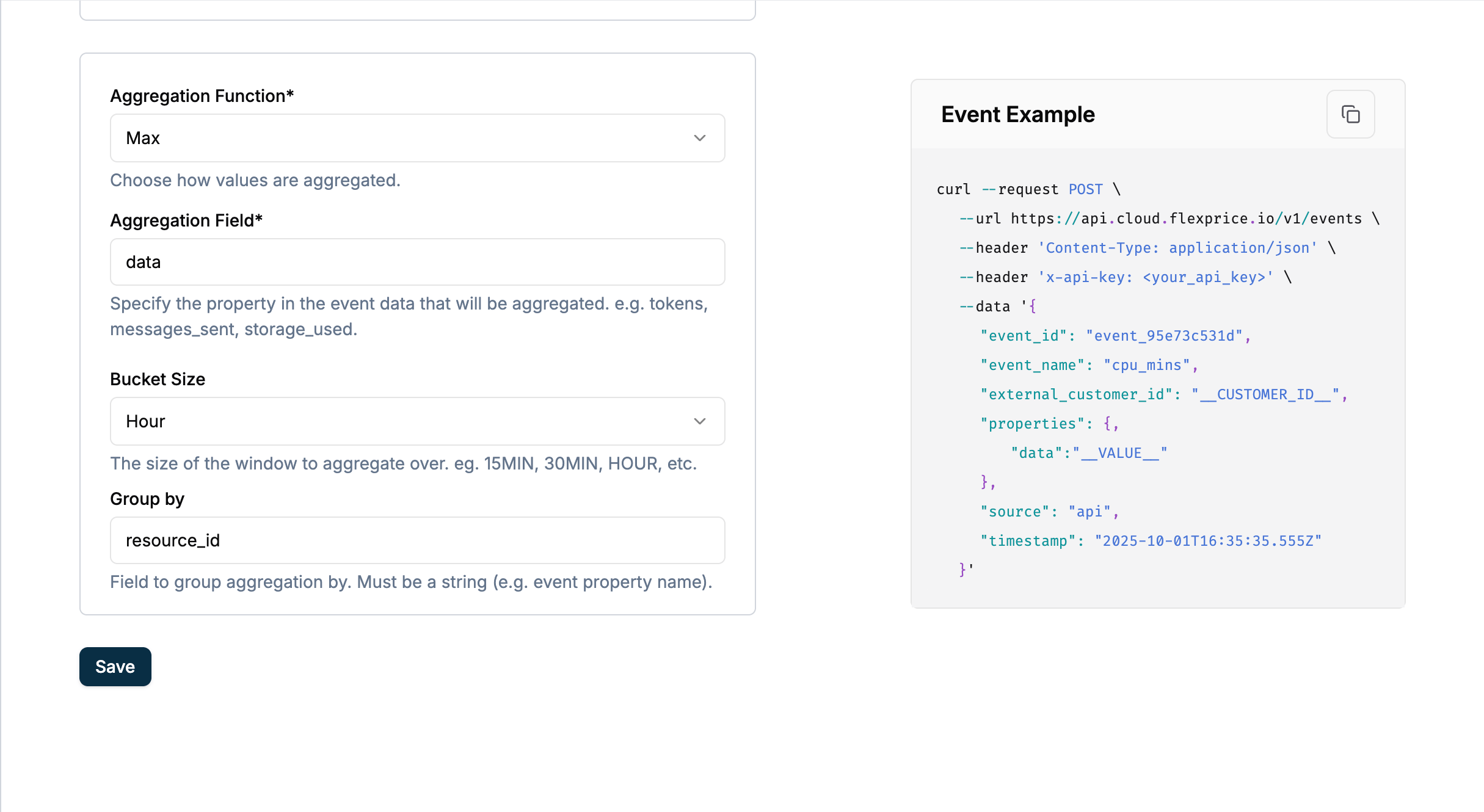
Event Data
Bucketed MAX with group_by Formula
group_by property; each group’s maximum is taken, then summed. Those per-bucket sums are then added together.
Calculation Process
Hour 1 (10:00–11:00 UTC):- resource_a: 10 → MAX = 10
- resource_b: 20 → MAX = 20
- Bucket 1 total: 10 + 20 = 30
- resource_a: 15 → MAX = 15
- Bucket 2 total: 15
group_by, bucketed MAX would give 20 + 15 = 35 (max per hour). With group_by: "resource_id", within each hour we sum the max per resource, then sum across hours: 45.
Use Cases
Standard MAX Use Cases
Peak Concurrent Users
Perfect for: Maximum simultaneous users, peak connectionsPeak Resource Usage
Perfect for: Maximum CPU, peak memory, highest bandwidthBucketed MAX Use Cases
Cumulative Peak Billing
Perfect for: Pay-per-peak hour models, capacity-based pricingInfrastructure Peak Tracking
Perfect for: Peak detection across time windows for billingBucketed MAX with group_by Use Cases
Requires Bucket Size to be set; group_by is only applied with bucketed MAX.Per-Resource or Per-Entity Peak Billing
Perfect for: Billing on the sum of peak usage per resource within each time window (e.g. per resource ID, per project ID, per region)Multi-Tenant or Multi-Project Peak
Perfect for: Sum of each tenant’s or project’s maximum usageWhen to Use Each Mode
✅ Use Standard MAX when:- Need simple peak detection
- Billing based on overall maximum
- Single highest value matters
- Cumulative peak billing models
- Time-series peak analysis
- Tiered capacity pricing
- Sum of peaks across time windows
- You already use bucketed MAX (Bucket Size is set) and want per-resource or per-entity breakdown
- Billing per resource, per project, or per entity within each time bucket
group_byis a single property name string on your events- Note: group_by is only applied when bucket_size is set
Key Differences
⚠️ Critical Notes
- bucket_size can ONLY be used with MAX aggregation - No other aggregation supports this
- Bucketed MAX sums the maximums - Does NOT return max of maximums
- group_by is only applied with bucketed MAX - You must set Bucket Size for group_by to take effect. Within each time bucket, events are grouped by the
group_byproperty; MAX is computed per group, then those group maximums are summed (per bucket), and bucket results are summed
Next Steps
- Creating a Metered Feature - Complete setup guide
- Sending Events - How to transmit MAX events