

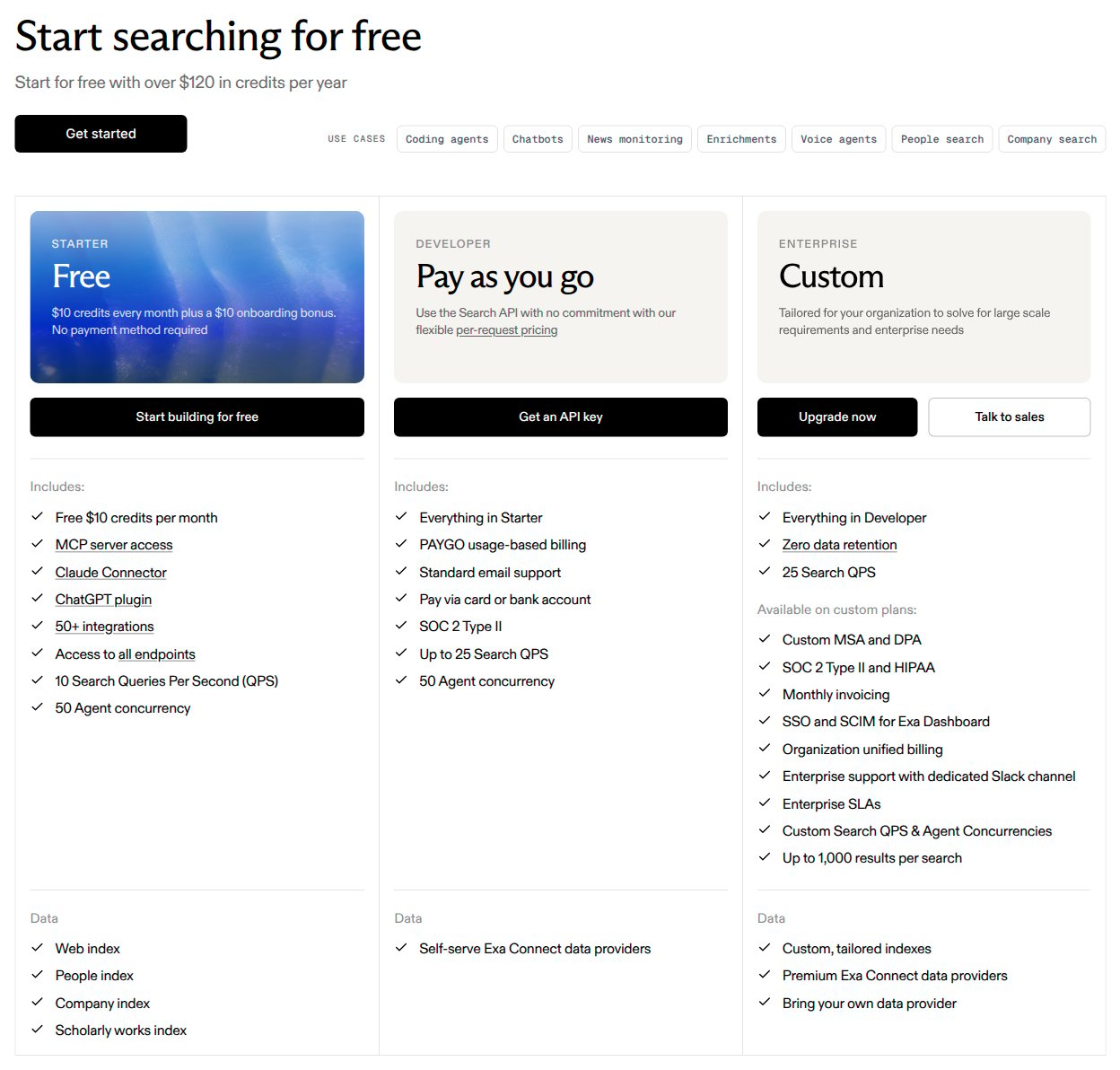
Exa's complete Free, Pay as you go and Custom plan comparison, captured from its official pricing page on November 10, 2026. Free credits and Enterprise terms provide context but are not configured in this example.
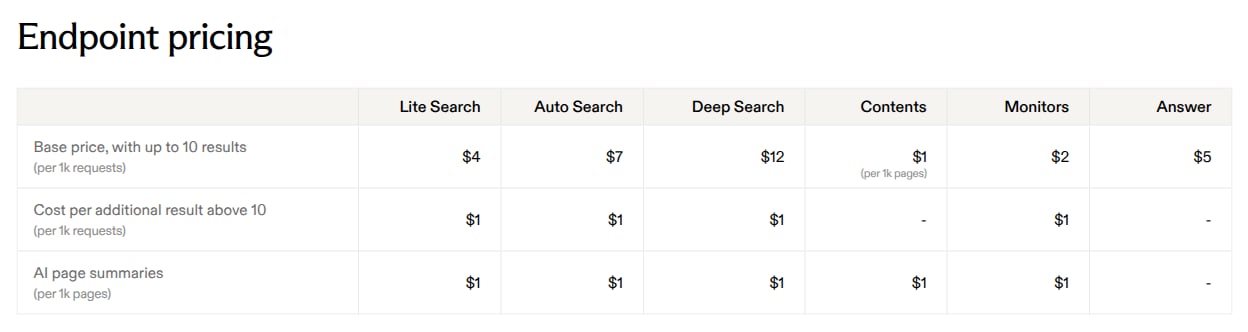
Exa's complete endpoint rate table, captured on November 10, 2026. Only Auto Search base requests and additional results are modeled; summaries and other endpoints are excluded. The pricing documentation clarifies that the additional-result rate applies per result above ten.
Modeled scope: Auto Search requests and their billable results above ten per request, at public list rates. The example assumes verified charged usage with no AI-generated summaries. It excludes free and promotional credits, prepaid funding and balance enforcement, other search types, Contents, Answer, Monitors, Agent, third-party data, Enterprise contracts, discounts and taxes. It calculates gross usage cost, not the amount a real Exa account must pay or top up.
Pricing profile
These labels describe the Auto Search usage component, not every Exa product or contract.Exa’s pricing at a glance
The pricing glossary defines one request as one API call. It explicitly says that a request for 20 results costs the base price plus 10 additional results. The extra-result threshold belongs to each request, not to a monthly pool. The first ten results are included in a paid request; they are not ten free search requests.
Design takeaways
- Keep request counts and result counts separate. The two published rates apply to different units. One meter cannot represent both without hiding the rate conversion. Two SUM meters preserve each quantity and produce separate invoice lines.
- Apply request-level inclusions before monthly aggregation. Exa’s 20-result example adds ten results to that request. Unused result capacity from a smaller request must not offset a larger one. Normalize additional results upstream rather than applying a monthly free-result tier.
- Do not confuse a rate card with a settlement model. Exa’s credits are a prepaid dollar balance. Reproducing that account would also require credit funding, grants and balance enforcement. This guide isolates gross charges and does not claim that monthly arrears recreates those controls.
How Exa’s pricing maps to Flexprice
The illustrative Flexprice plan below bills monthly in arrears so both components can be inspected on an invoice. This is an implementation choice for the gross-cost example, not Exa’s prepaid collection model. Do not use it as a complete Exa account configuration without separately implementing the excluded credit lifecycle and service controls.
Create the two features and meters
Create Exa Auto Search requests with this illustrative feature payload:Configure the usage-only plan
Create a plan for this scoped model:FLAT_FEE here means a constant usage rate, not a fixed subscription fee. Do not add package rounding, a minimum charge, or a monthly allowance of ten results. Add an unlimited metered entitlement for each feature, then create a customer and a subscription to this plan with quantity 1. Unlimited access does not make the usage free. No recurring fixed charge or credit grant belongs in this gross-cost example.
Normalize and send usage
Your integration must record billable Auto Search requests and compute their additional-result quantities before sending usage events. For requests whose billable result quantity is known, applymax(billable_results - 10, 0) per request, then sum those additional quantities.
For example, a one-result request followed by a 20-result request contributes 2 requests and 10 additional results, costing $0.024. Calculating
max(21 - 2 × 10, 0) after aggregation would incorrectly bill only one additional result.
The following event illustrates one charged 20-result Auto Search request:
type and numResults; the integration maps the selected type to search_type. Reconcile normalized quantities with Exa’s charged usage. Do not infer failed-request charges or short-response adjustments from this example. Keep summary generation disabled and route other search types away from these prices.
Use a stable event ID and preserve the original timestamp when retrying delivery of the same usage record. Flexprice deduplication requires both to match. A separately charged provider request is a separate record. Do not send both a batch and its individual constituent records to these meters.
Worked gross usage calculation
Suppose the example period contains 10,000 billable Auto Search requests with 10 results each and 2,500 billable Auto Search requests with 20 results each, with no summaries or other products.
There is no rounding to whole blocks of 1,000. For instance, one charged 20-result request contributes $0.017 before currency rounding, not a $7 base package. Retain decimal precision through aggregation and round only the final currency amounts. The $112.50 is not a top-up requirement or a claim that a real Exa invoice ignores available credits. This guide documents configuration and arithmetic; it does not execute setup or API calls.
Pricing sources
- Exa pricing: plan comparison, self-serve entry point and endpoint rate card.
- Exa pricing documentation: Auto Search rates, per-request result inclusion, additional-result counting, free credits and prepaid billing.
- Exa Search API: search type and result-count parameters.