

sync_config.deal.outbound in the API.
When Attio deal sync runs
Deal sync needs the Deals toggle on, and a customer withattio_deal_id in its metadata. Customers created or linked by customer sync have it.
Each run works from the subscription’s current state, so a later run picks up every change made in between. A run that fails is retried up to three times.
Which Attio deal a subscription syncs to
The first deal sync for a subscription links it to the deal in the customer’sattio_deal_id metadata. Every later run updates that same deal, even after the customer wins another deal and customer sync moves attio_deal_id to it.
Each deal holds one subscription. If the deal in attio_deal_id is already linked to another subscription, a new subscription for the customer is not linked and does not sync until you move it to a deal of its own, as described in Moving a subscription to a different Attio deal.
What Flexprice writes on the Attio deal
Deal value is a standard attribute of Attio’s Deals object. Flexprice adds the four Flexprice attributes to your Deals object the first time deal sync runs, which is why the token needs Object Configuration at Read-write. Flexprice does not create them again if they already exist.
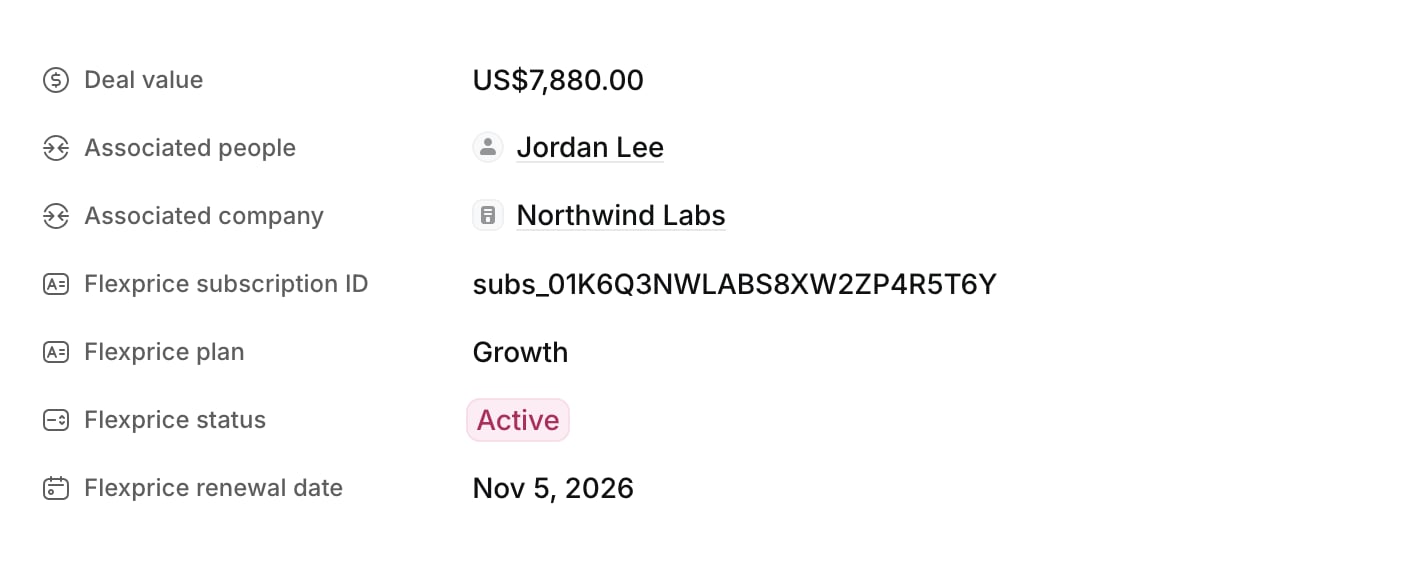
How Flexprice calculates the deal value
Flexprice adds up the subscription’s recurring fixed-price line items. Each one counts as its amount multiplied by its quantity, scaled to one year by its billing period:
For example, 10 seats at $49 a month plus a $2,000 annual platform fee give a deal value of 10 × 49 × 12 + 2,000 = $7,880.
These charges are left out of the deal value:
- Usage-based line items, because their amount depends on usage that has not happened yet.
- One-time charges, such as a setup fee.
- Line items that have ended.
- Discounts, credits, and taxes. The deal value is the list price of the recurring charges.
What Attio deal sync leaves unchanged
- Deal stage, owner, name, and associations. Flexprice writes only the five attributes in the table above.
- Deal value after cancellation. Cancelling a subscription sets Flexprice status to
Cancelledand leaves Deal value as it was, so the deal keeps the revenue it was won with. - Edits made in Attio. Flexprice does not read deals back. The next deal sync overwrites the five attributes with Flexprice’s values.
Moving a subscription to a different Attio deal
Flexprice links each subscription to one deal and keeps updating it. To move a subscription to another deal, for example after a renewal deal is won, remove the link with Delink integration mapping, passing the Flexprice subscription ID:attio_deal_id in the customer’s metadata to the new deal’s record ID, if customer sync has not already done so. The next deal sync for the subscription links it to the new deal and writes the five attributes there. The old deal keeps the values Flexprice last wrote; clear them in Attio if they should not stay.